
What Is the Mexico Pterodactyl AI Video? The Beats, the Caption, and How to Make One From a Photo
The Mexico pterodactyl AI video explained: what the walk-the-pterodactyl clip shows, the beats in order, which photo works, and how to turn one photo of yourself into an 8-second clip and label it as AI.
 Theo Marchetti
Virtual editorial column · Meme history and origins
CircleAIDance editorial content; the profile image is AI-generated and does not represent a real customer, independent reviewer, or named human expert.
AI-assisted explainer written on November 19, 2026 from how the effect works on our own generator; it cites no search volumes, dates, locations or competitor figures. The sample clip, the photo and the creature are AI-generated.
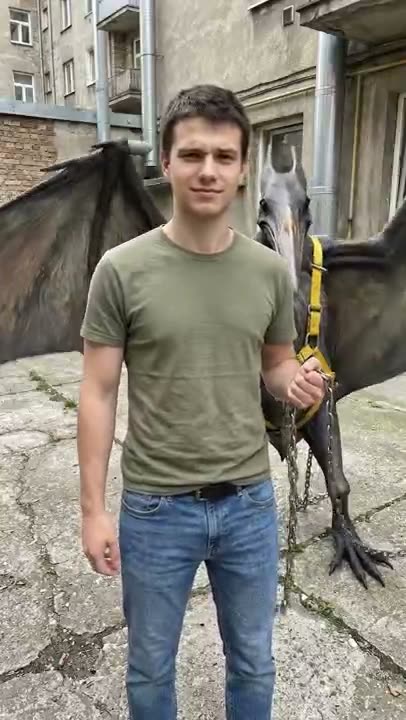
The Mexico pterodactyl AI video is a popular way to drop yourself into a joke clip. You stand holding a steel chain as if you were walking a dog, and the other end is clipped to a huge pterodactyl-like creature. The fun is the contrast: a calm person, a very large animal, and a caption like “it got loose, but I caught it again.”
What happens in the clip?
Four beats, in order:
- Stand and hold the chain. You face the camera, calm and a little smug, with the chain in one hand.
- The pterodactyl lands. A large winged creature drops in beside you and the chain goes taut, tugging you slightly forward.
- Wings spread, chain tight. The creature flares its wings and pulls, and you turn to deal with it, like this happens every day.
- A pat to finish. The pterodactyl folds its wings and settles, and you give it a pat.
The camera stays fixed in a courtyard, a bit below eye level, and you stay in the frame from head to knees.
How do you make a pterodactyl AI video from a photo?
Upload one clear standing photo to the Mexico pterodactyl AI page and press generate. The AI keeps the face, hair and clothes of the person in the photo, hands them a steel chain and runs the four beats as an 8-second vertical clip. It costs 30 credits, and failed renders are never charged. The clip is silent, so add your own sound and a caption when you post.
Which photo works best?
A sharp, well-lit photo of one person standing and facing the camera, from the head to at least the knees, with a free hand for the chain. Sitting poses, sunglasses, heavy filters and small faces in a group shot work poorly. The creature is AI-generated and looks a little different every run, and the exact timing of the landing and the tug is approximate. Only use photos of yourself or adults who agreed, and no celebrities.
Do you have to label it as AI?
Yes. The clip is AI-generated, so mark the post as AI-generated when you share it.
For other trends, see how the Bow Bow Bow dance works, the how I become a millionaire AI skit, or the baby mustache AI trend.
Related guides

What Is the Passenger Princess AI Video? The Beats, the Caption, and How to Make One From a Photo
The passenger princess AI video explained: what the front-seat clip shows, the beats in order, which photo works, and how to turn one photo of yourself into an 8-second clip and label it as AI.
Theo Marchetti
What Is the “How I Become a Millionaire” AI Skit? The Beats, the Captions, and How to Make One
The “how I become a millionaire” AI reaction skit explained: what the clip shows, how to add the question and reply as captions, which photos work, and how to make an 8-second version from one photo and label it as AI.
Theo Marchetti
What Is the Bow Bow Bow Dance? The Moves, Step by Step, and How to Make One From a Photo
The Bow Bow Bow dance explained: what the point-and-bounce dance is, the moves beat by beat, which photo works, and how to turn one photo of yourself into an 8-second clip and label it as AI.
Theo Marchetti
What Is the Baby Mustache AI Trend? How the Clip Works and How to Make One
The baby mustache AI trend explained: what the newborn-with-a-mustache clip is, what happens in it, which photos work, whether you can use your own baby or a pet, and how to label it as AI.
Theo Marchetti
Photo to Dance Video: How to Turn One Picture Into a Toc Toc Clip
A practical guide to the one-photo-to-dance workflow: how to choose a photo (single subject, full body, lighting, framing), what to avoid, and how to fix a result that drifts — for a 12-second vertical toc toc video at 100 credits.
 Maya Chen